Basic Usage
1. The WSDL Import: Setting the Stage
In SoapUI, you don't start by typing URLs from scratch. Everything revolves around the WSDL. Importing it is like handing SoapUI a complete map of the API; once it has that file, it knows exactly what the server expects.
How to get started:
-
Create a New SOAP Project: This is your workspace. Instead of a blank slate, you’re setting up a structured environment for your enterprise tests.
-
The WSDL URL: You feed SoapUI the URL (or a local file) of the WSDL. This is the "contract" we talked about.
-
The "Magic" Generation: Once you hit 'OK', SoapUI doesn't just sit there. It parses the entire XML and automatically builds:
-
The Service Map: Every endpoint defined in the contract.
-
The Operations: A full list of every method (like GetUser, processPayment) you can call.
-
Sample Requests: This is the best part—it generates perfectly formatted XML templates for every operation. No more guessing which tags go where.
Think of the WSDL import as automated documentation. Within seconds, you go from having nothing to having a fully interactive test suite where you just need to fill in the data.
2. Inside a Sample SOAP Request
After the import, SoapUI gives you a pre-filled XML template. If you’re used to clean JSON, a SOAP request can look like a wall of text at first, but it follows a very predictable anatomy.
What you’re looking at:
-
The Envelope (\<soapenv:Envelope>): This is the wrapper for everything. It tells the server, "Hey, this is a SOAP message."
-
The Header (\<soapenv:Header>): Usually empty by default, but this is where you’ll eventually drop your authentication tokens or metadata.
-
The Body (\<soapenv:Body>): The "meat" of the request. Inside this, you’ll find the specific operation name (like getUserDetails) and the actual data you're passing.
Example: Querying a User
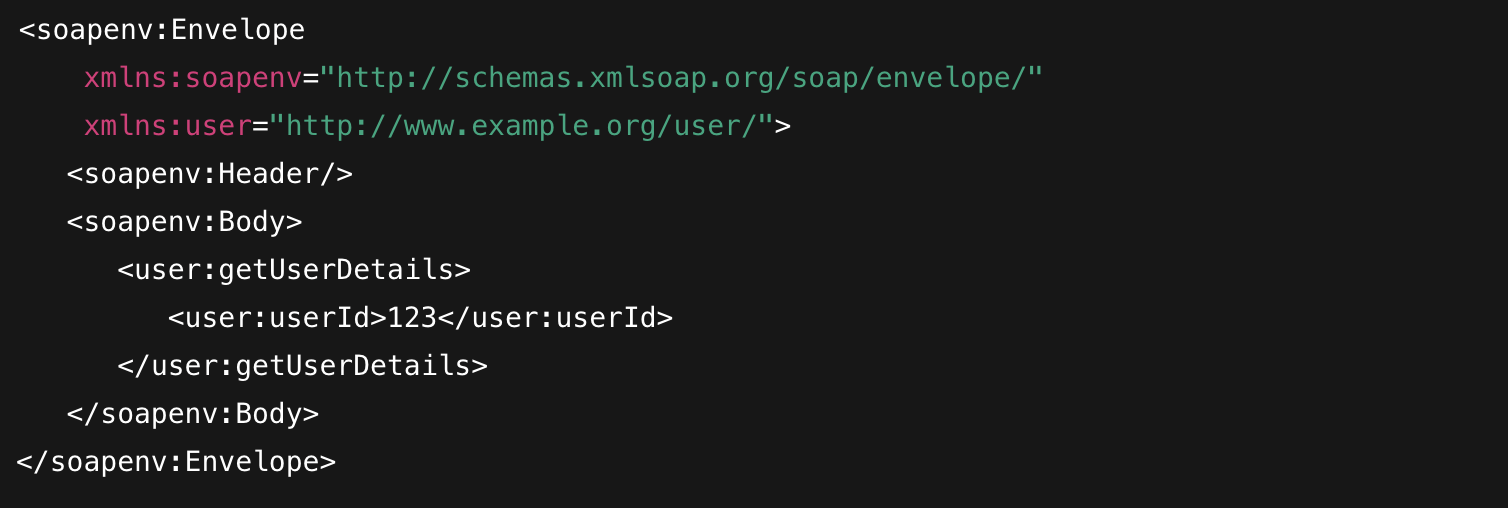
The Pro-Tip: In SoapUI, you don't need to memorize these namespaces (xmlns). You just locate the userId tag, swap 123 for the ID you want to test, and hit the green play button. If the WSDL is correct, SoapUI ensures the rest of the structure stays perfectly compliant with the server's rules.
3. Assertions: Locking Down the Response
In SoapUI, an assertion is your "pass/fail" criteria. Without them, you're just sending messages into the void and hoping for the best. Since SOAP is so strict, your assertions need to be just as precise to catch any drift in the API's behavior.
The Essentials You’ll Use Every Day:
-
HTTP Status Assertion (The "Is it alive?" check): This is your first gate. You’re usually looking for that 200 OK. If the server returns a 500 or 404, SoapUI kills the test right here before even looking at the XML.
-
Contains Assertion (The Quick Check): This is the "Ctrl+F" of testing. You tell SoapUI to scan the entire response for a specific string—like \<status>Active\</status>. It’s simple, but it’s the fastest way to verify that your data actually made it back.
-
SOAP Fault Assertion (The "Hidden Failure" trap): This is a unique one for SOAP. Sometimes a server returns a 200 OK but the XML inside contains a \<SOAP-FAULT>. This assertion ensures the response isn't secretly telling you it failed while pretending to be fine.
How we use them in practice: We don't just add one. A production-ready test case usually stacks these. We check the Status first, then verify the Contract (Schema), and finally use Contains or XPath assertions to dig into the business logic. If any single one fails, the whole step turns red, and you know exactly where the "contract" was broken.
4. XPath Match: Surgical Precision
When a "Contains" assertion isn't enough, you bring in the big guns: XPath.
XML is nested and messy. If you just check for the number 123, it might pass because it found a zip code or a total price. XPath Match allows you to point exactly at the specific tag you care about, ensuring you're validating the right data in the right place.
How it works in the real world: You define a path (like a file directory) to the element. SoapUI looks exactly there and compares the value against your expectation.
Example: Verifying the User ID
-
XPath Expression: //ns1:getUserDetailsResponse/ns1:userId
-
Expected Result: 123
Why this is a lifesaver:
-
Namespace Handling: SoapUI has a "Declare" button that automatically handles those annoying XML namespaces (ns1, soapenv, etc.). Without this, writing XPath manually is a nightmare.
-
Logic over Luck: By using XPath, you aren't just hoping the word "Active" appears somewhere in the response. You are confirming that the status field specifically says "Active".
If the backend team changes the structure or the data doesn't match your business logic, this assertion will catch it instantly, even if the rest of the XML looks "fine" to the naked eye.
5. Schema Compliance: The Ultimate Contract Guard
In REST testing, schema validation is often an extra step. In SoapUI, it is the backbone of everything. Schema Compliance is what ensures the API isn't just "answering," but is actually "obeying" the strict rules laid out in the XSD (XML Schema Definition).
Think of this assertion as a continuous contract audit. It checks the entire response against the WSDL to catch errors that a human—or a simple XPath check—would never see.
What this assertion catches (so you don't have to):
-
Mandatory Field Gaps: If the backend dev accidentally drops a "Required" field, the test fails instantly. No more "NullPointerExceptions" in your frontend.
-
Type Sabotage: If the contract says "Integer" but the server sends "123.45" or a string, SoapUI flags it as a violation.
-
Structural Chaos: XML is picky about order. If elements are swapped or extra, undefined tags creep in, Schema Compliance shuts it down.
Why this is the "Gold Standard" for Enterprise: When you’re dealing with downstream systems that expect a very specific XML format, even a tiny deviation can crash a legacy integration. By running this assertion, you aren't just checking if the data is correct; you are ensuring that the interface itself hasn't mutated. It’s the difference between "I think it works" and "I know it’s compliant."
The SoapUI Advantage: A Quick Recap
SoapUI isn't about speed; it's about certainty. Here’s what it actually brings to your engineering toolkit:
-
Instant Scaffolding: You import a WSDL, and SoapUI builds your entire test world for you—no manual request building required.
-
Precision Assertions: From simple HTTP status checks to complex XPath queries, you can verify data with surgical accuracy.
-
Hardcore Compliance: It acts as a continuous audit, ensuring every single response strictly follows the XSD contract.
Conclusion: Why it’s the "Enterprise Standard"
SoapUI provides a contract-driven, reliable testing solution that REST-native tools often struggle to match in complexity. In an era of lightweight APIs, SoapUI remains the heavyweight champion for mission-critical systems.
It’s the tool that keeps the "legacy giants" in check. By catching schema drifts and breaking changes before they hit production, it significantly reduces the risk of expensive downtime in banking, insurance, and telecommunications.
Why This Matters: In a modern pipeline, SoapUI isn't just another testing layer—it’s your safeguard. It ensures that as your systems evolve, your complex service contracts remain unbreakable. For enterprise-level integrations where data integrity is paramount, SoapUI is the difference between a stable deployment and a catastrophic integration failure.