Collection & Environment Management
If you’re working on a large project, you can't just have a messy list of requests in your sidebar. The real power of Postman comes when you stop thinking about "individual endpoints" and start organizing your collections around business logic.
Instead of just grouping by "User API" or "Product API," I find it much more scalable to mirror the actual system architecture. This way, when a service changes, you aren't hunting through 50 folders to find the affected tests.
The other half of the puzzle is Environment Management. You shouldn't be hard-coding URLs like localhost:8080 or api.staging.com into your requests. By using environment variables, you can swap between dev, staging, and production with a single click. It’s about keeping your collections "clean" and ensuring that your tests are portable across the entire development lifecycle.
1.1 Structuring Collections Like a Pro
If you just list your requests in a random sidebar, your workspace will eventually become a mess that nobody wants to touch. The trick is to treat your Collections as business domains or microservices, not just a bucket for URLs. It’s about knowing exactly where to go when a specific service fails.
Focus on Microservices
Don't mix different services in one collection. Each one should represent a single microservice or a "bounded context." This keeps your tests aligned with the actual system architecture, making it way easier to update things when a service evolves.
Folderization: Workflows over HTTP Methods
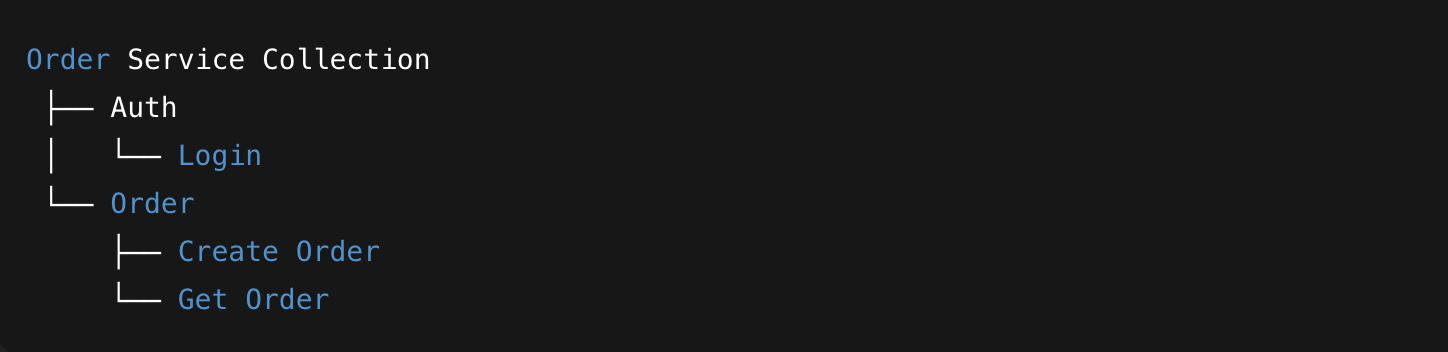
I often see folders named "GET" or "POST." Honestly? That’s useless for testing. Instead, organize your folders by Business Flows. Your folder names should look like "User Onboarding," "Payment Flow," or "Inventory Check." This mirrors how a real user interacts with your system, which makes debugging much more intuitive.
Example:
Leverage Script & Auth Inheritance
If you find yourself copy-pasting an Auth token or a header into every single request, you're wasting time. Define your authentication and common pre-request scripts at the Collection level. Every request inside will inherit them automatically. This prevents "configuration drift" and ensures that if you change your auth logic once, it updates everywhere.
1.2 Smarter Environments
Hardcoding a URL or an auth token is a cardinal sin in API testing. If you have to manually change localhost to staging every time you run a test, you’re not just wasting time—you’re creating a suite that’s bound to fail during a demo or a CI/CD run.
Use Variables for Everything
Anything that changes based on where the test is running—URLs, IDs, secrets—needs to be a variable like {{base_url}}. This makes your collection portable. You should be able to hand your collection to a teammate, and they should be able to run it instantly just by picking the right environment from the dropdown.
- Pro Tip: Even "fixed" IDs that vary between Dev and Staging should be variables. Never assume an ID in your local DB exists in production.
Initial vs. Current Values: The Security Guard
Postman has two columns for variables, and most people ignore the difference. This is a massive mistake.
-
Initial Values: These get synced to the Postman cloud. If you put a production password here, everyone in your workspace can see it.
-
Current Values: These stay locally on your machine.
The Rule: Always put sensitive keys and passwords in the Current Value column. It’s the simplest way to prevent accidental security leaks.
The One-Click Switch
The goal is to have a seamless workflow. By defining a base_url variable in separate environment files (Local, Staging, Prod), you can jump between them with a single click in the top-right corner. This eliminates the "oops, I accidentally hit the production DB" heart attacks because you can see exactly which environment is active at a glance.
Best Practices for Your Environments
External Dependencies? Use Variables.
If something exists outside of Postman—like a URL, an API key, or a database ID—it needs to be environment-driven. Period. Hardcoding these is the fastest way to break your tests when you move from your local machine to a CI/CD server.
When you use variables like {{base_url}} and {{auth_token}}, your requests become "agnostic." They don't care where they are running; they just grab whatever value the active environment provides.
Example Scenario:

Imagine you have two environments set up in Postman:
-
Local: base_url is http://localhost:8080
-
Staging: base_url is https://api.staging-env.com
With this setup, you can switch the target of your entire 50-request collection with one click in the top-right corner. No more manual searching and replacing strings.
Usage Example:

Initial vs. Current Values: The Security Hack
Postman has two columns for every variable, and most people ignore the difference until it’s too late.
-
Initial Values: These get synced to the Postman cloud. If you put a production password here, everyone in your shared workspace (and Postman’s servers) can see it.
-
Current Values: These stay strictly on your local machine.
The Golden Rule: Always put your sensitive API keys, secrets, and tokens in the Current Value column. It’s the easiest way to prevent accidental security leaks while still letting your teammates use the same collection with their own local credentials.
The "One-Click" Workflow
The whole point of this setup is to avoid the "oops, I thought I was on Staging" heart attacks. By mapping everything to a {{base_url}}, you get a seamless dropdown menu in the top-right corner.
-
localhost: Points to your local dev machine.
-
staging: Hits the QA environment.
-
production: For that final, careful validation.
You jump between them with one click. No manual editing, no "search and replace" errors, and zero risk of accidentally hitting the wrong DB because you forgot to update a string in a request.
Why We Prefer This Setup
At the end of the day, test automation shouldn't feel like a chore. If you have to spend 10 minutes configuring your environment every time you want to run a test, you’re eventually going to stop running them.
By structuring your collections around business logic and sticking to environment variables, you're building a suite that is stable, secure, and actually usable for the whole team. It turns Postman from a simple "request sender" into a professional tool that scales as your project grows.