Data-Driven Testing
As your API grows, you’ll eventually need to test the same endpoint with 10, 50, or 100 different inputs. If you’re copy-pasting scenarios to do this, you’re creating a maintenance nightmare. Karate’s data-driven approach is designed to solve exactly this by separating what you test from the data you use.
How to Feed Data into Your Tests
Karate is pretty flexible with how it handles datasets:
- Inline Tables: For a quick check with 3-4 variations, you can just drop a table right into your feature file. It’s great because you can see the data and the logic on the same screen.
- Scenario Outlines: This is the bread and butter of data-driven testing. You write the scenario once, use placeholders like \<username>, and let the Examples table do the rest.
- External Files (JSON/CSV): If you have 500 rows of data or if your data is managed by another team, you don't want it cluttering your feature file. You can just point Karate to an external .csv or .json file and it will loop through every row automatically.
Example: Login Validation with Multiple Inputs
Instead of writing three different login scenarios, you write one:
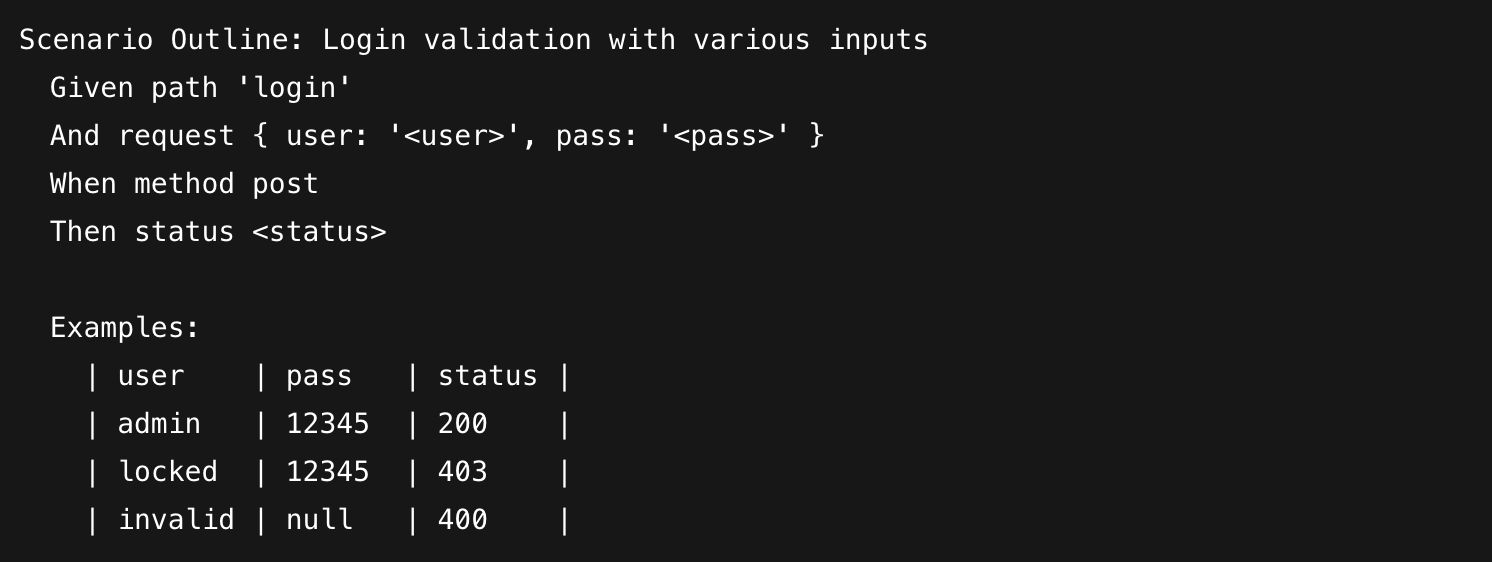
In this case, Karate runs the entire flow once for each row in your table. If the second row fails, the report tells you exactly which input caused the issue without stopping the rest of the suite.
Why we use this
The biggest win here is scalability. When the login logic changes, you only have to fix it in one place, not in twenty different scenarios. It keeps your feature files lean and allows you to cover edge cases—like empty strings, long passwords, or special characters—just by adding a single line to a CSV file. It’s about getting maximum coverage with minimum effort.